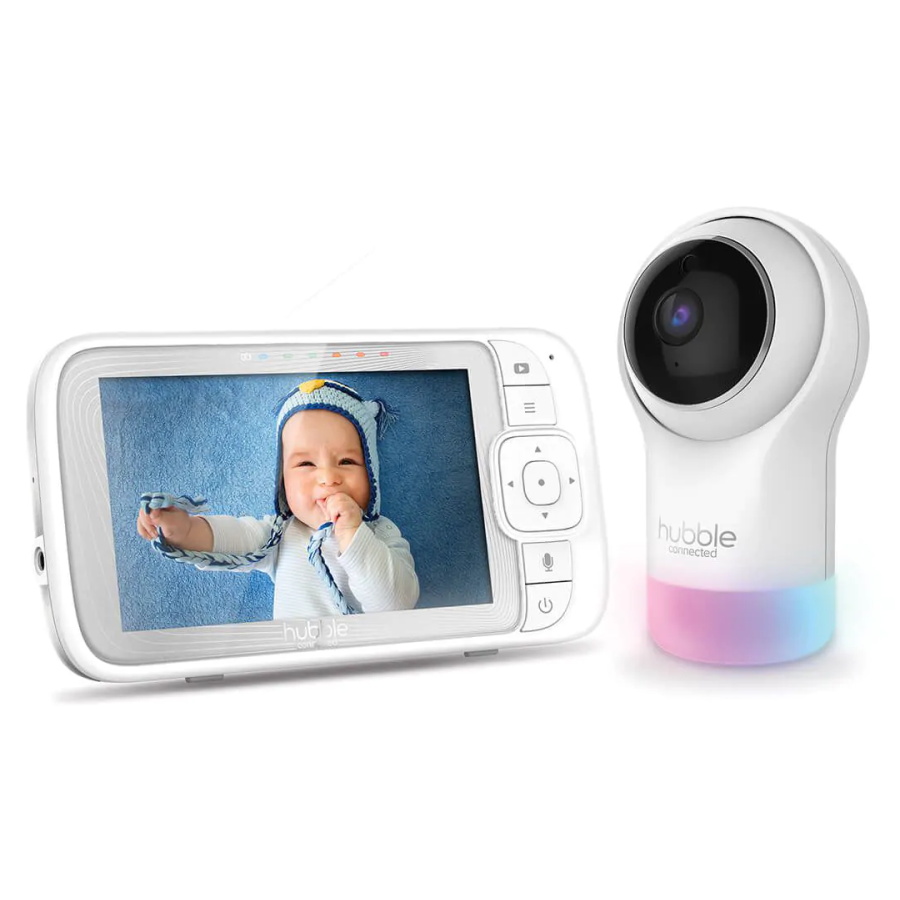
Hubble HB565 Nursery Pal Glow+ review: 5-inch baby monitor, camera and app access. Compare features, subscriptions, privacy, limitations and LastPrice details in Israel.
Looking for a baby camera with a dedicated parent screen and phone access? The Hubble Connected HB565, described by the retailer as Nursery Pal Glow+, combines a parent display, camera and nursery features. This review explains the listed functions and the questions worth resolving before purchase.
We checked LastPrice specifications and purchase details alongside relevant official guidance. We have not used the product at home or measured image quality, reception range or battery life. Distinguishing the display from the app, free services from subscriptions and a consumer camera from a medical device is especially important.
A baby monitor with a screen and an app: what is the practical benefit?
The HB565 listing presents two ways to view the camera: a dedicated parent unit with a 5-inch screen and access through a compatible smartphone. A separate screen may suit parents who want to keep their phone available for other tasks. App access adds another option, but its connection requirements, permissions and service terms need checking separately.
Before buying, ask where you intend to watch. A parent at home within the unit’s operating range may prefer the screen; internet viewing introduces a network and account dependency. Do not choose by feature count alone. Consider whether your family needs both options and how the people regularly caring for the baby will use them.
We have not tested range in a particular home, video delay or connection stability through walls. Check picture and sound in the places where the caregiver will actually be before depending on the device. A working screen is not a reason to leave an infant without a responsible caregiver nearby: remote viewing is not a supervision service.
Nursery camera image quality: the screen and resolution details
LastPrice specifies a 5-inch parent display at 480×272. The same page mentions 720P for the camera and HD1080 for smart-device access. The last figure should not be taken to mean the supplied screen displays 1080p. The relationship between the camera, stream and app specifications is not fully explained in the listing.
If image resolution is a deciding factor, ask the retailer to confirm the specification of the HB565 version supplied in Israel. Overseas pages for similarly named Nursery Pal Glow models may describe a different revision. We have not transferred image-quality promises or resolution claims from another version.
Beyond the numbers, consider what you need to see and where the camera will stand. Position, distance and lighting affect the resulting view. We have not compared sharpness against other cameras, tested motion rendering or measured low-light performance. This is a review of specifications and potential use, not a laboratory image-quality rating.
Camera movement, night vision and two-way talk
The retailer lists movement, tilt and zoom controls, infrared night vision and two-way communication. These may help when the initial framing misses the desired area or when a parent wants to speak through the unit. Movement angles, zoom type and real-world speech quality have not been verified.
Set up the view with an adult beside the crib, then check it under the lighting conditions you use at night. Ensure the camera is stable and movement does not pull the cable taut. A moving camera does not compensate for poor placement, and it should not be brought close to the baby’s face for a close-up.
Two-way talk transmits a voice; it does not replace entering the room when the baby needs care. Night vision provides a dark-room image, not a breathing assessment, medical diagnosis or assurance that everything is well. Check the baby directly if you are concerned and seek appropriate help.
HubbleClub app: subscriptions and additional costs to check
The retailer distinguishes between free app services and paid premium options. Features such as alerts and cloud recordings are described within subscription services. The purchase price may therefore not be the full cost if ongoing recording storage or particular services are important to you.
Before paying, check the current terms for what works without a subscription, what requires a paid plan and the price available in Israel. If a trial is offered, check whether it renews automatically and how cancellation works. No monthly or annual subscription price has been verified here, and the retailer’s package description is not a promise of unchanged future terms.
The specification lists 2.4GHz Wi-Fi and a Hebrew-language app. Ask about compatibility with your phone’s operating system, supported sharing with another caregiver and the features available for the exact model. Also establish what continues working without internet or when the phone is unavailable. Do not assume the screen and app behave identically in every situation.
Privacy when using an internet-connected baby camera
A nursery camera may also capture parents and caregivers in private moments. Before enabling remote access, decide who needs it, whether recordings are necessary and which parts of the room should be visible. Discuss camera use with caregivers rather than leaving them to discover it unexpectedly.
The FTC recommends checking encryption, using unique passwords and keeping cameras and apps updated. Enable additional authentication if the service supports it, and establish how to remove access that is no longer needed. We have not audited the product’s security and do not promise that the camera is immune to compromise.
Read the service policy for what is stored in the cloud, for how long and how it can be deleted. A feature need not be enabled simply because it exists. If local viewing is all you require, ask how that configuration works on this model and which parts remain network-connected. Prefer supported access permissions over automatically sharing an account password.
Battery, room temperature display and night light
The retailer advertises up to 15 hours of parent-unit standby. “Standby” matters: this does not establish 15 hours of continuous video viewing. Screen brightness and use can affect power consumption. If you plan extended operation away from a socket, ask about runtime under conditions matching your use.
The specification lists a rechargeable parent screen and power adapters for both screen and camera. That does not establish that the camera is battery-powered. Plan the socket and cable location before installation, keeping adapters dry and accessible to an adult according to the instructions. Ask what happens when power returns after an outage.
Additional listed features include a seven-colour night light, room temperature display, lullabies and nature sounds. These are conveniences, not reasons to overlook placement or volume settings. A room sensor is not a body thermometer, and the number of light colours does not prove a sleep benefit. Enable only the features you need.
Safe placement: camera and cables outside the crib
Hubble’s Nursery Pal Glow+ family support guidance says never to place the camera or cords inside the crib. Follow the installation instructions supplied with your particular version. Choose a stable surface beyond reach and route cords so they remain inaccessible as the baby becomes able to pull up.
Do not use a monitor as evidence of SIDS prevention. The AAP explains that consumer monitoring does not replace safe sleep practices. An image and sound do not remove the need for an appropriate sleep surface and adult care. This review does not attribute breathing measurement, heart-rate monitoring or medical diagnosis to the HB565.
Check installation before starting nighttime use: picture and sound, cable placement, access to controls and unnecessary account permissions. Recheck the position when the room layout changes. Our infant safe sleep guide covers the underlying setup; viewing equipment is an addition to that environment, not a replacement for it.
Is the Hubble HB565 right for you, and what should you check?
This model may suit a family wanting a dedicated screen alongside phone access and willing to check the network and app settings. If you do not want an online account or a subscription, first establish whether local use meets your needs. If you only want light and sound, a white noise machine with a night light serves a different, simpler purpose.
At the check date, the direct purchase price was ₪699 for product 100069714. The “make an offer” option is not a guaranteed transaction price, so it is not presented here as the purchase offer. Ordering controls appeared with “check stock”; confirm availability rather than assuming stock at a specific branch.
The listing showed collection-point delivery for ₪9 within 1–7 business days and a one-year official-importer warranty, subject to the certificate. Confirm delivery, warranty and the supplied version at checkout. Your three main questions are the image specification, what works without a subscription and compatibility with your network and phones. Clear answers are more useful than a general promise of peace of mind.